
When a customer starts a chat by tapping a WhatsApp ad, or the WhatsApp button on your Facebook Page, and you reply within 24 hours, Meta opens a free window during which every message you send that customer is free: replies and templates alike. For chats that start from an ad, the window can stay open for up to 7 days. For chats from the WhatsApp button on your Facebook Page, it lasts 72 hours. Meta sets the exact end time for each conversation, so go by the countdown rather than a fixed number. The window only opens when the customer tapped from the WhatsApp app on their phone; taps from WhatsApp on a computer do not qualify.
Chats that start from an ordinary Facebook post, one that is not an ad, do not open a free window. Messages to those customers are billed as usual.
The Free ad window countdown
Above the messages in an Official WhatsApp API conversation, Free ad window counts down how long the free period has left, for example Free ad window · 2d 4h. It appears once your first reply has been delivered and disappears when the window closes. The end time comes from Meta for each conversation, so one customer’s window may run 3 days and another’s 7. Hover it to see what it means, the exact end time, and a link back to this article.
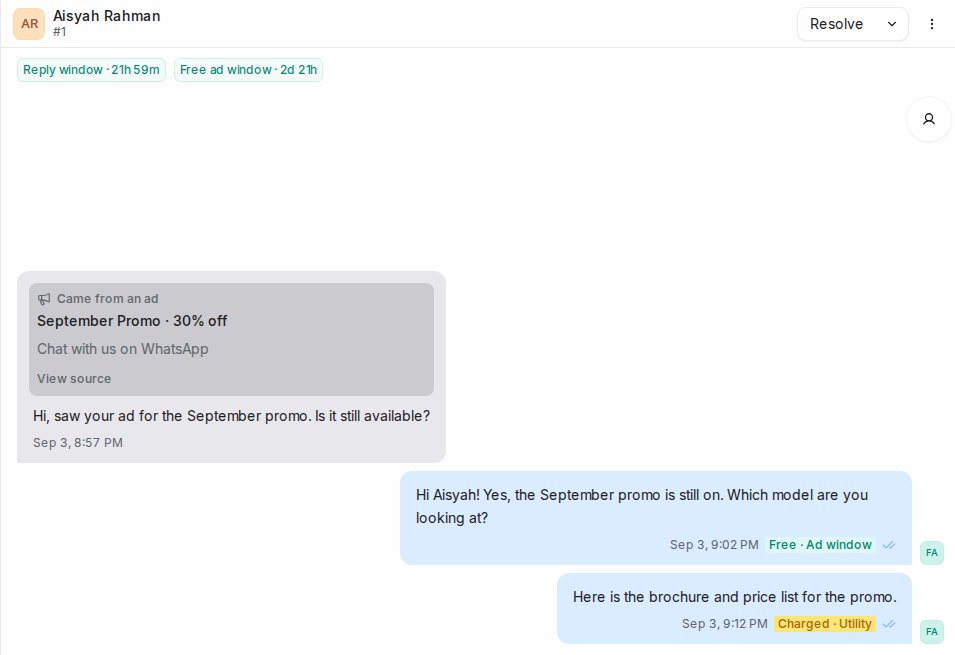
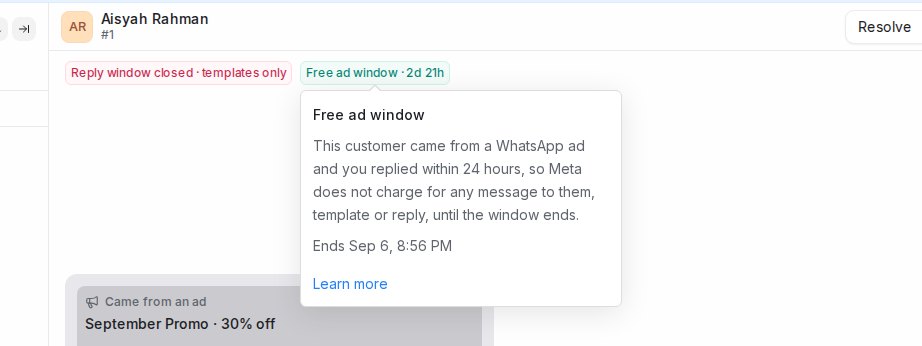
The conversation also shows which ad the customer came from: a Came from an ad card on their first message, and the ad details in the conversation information panel.
Message tags
Messages you send from Mampu AI in an Official WhatsApp API conversation carry a small tag next to their time, based on how Meta billed them:
- Free · Ad window: sent inside the free ad window, not charged.
- Free: a reply inside the 24-hour reply window, not charged.
- Charged · Utility, Charged · Marketing and similar: a message billed at that category’s rate.
The tag is Meta’s own verdict for that message and appears shortly after it is delivered. A message with no tag means Meta has not reported how it was billed. That is normal for messages typed in the WhatsApp app on your phone, for private notes, and for older messages. Only a tag confirms that a message was free.
Where these rules come from
The free ad window and its conditions are set by Meta, not by Mampu AI, and Meta changes them from time to time. This article reflects Meta’s WhatsApp Business Platform pricing and upcoming pricing updates pages, and the up-to-7-day window for ad chats announced in Meta’s WhatsApp Business Platform changelog on 28 September 2026, as read on 14 October 2026. Check those pages for the current rules before making decisions based on cost.
Making the most of the window
- Reply within 24 hours. Any message counts, a plain reply or a template. If you miss the 24 hours, no free window opens and your next message is billed as usual.
- Keep the customer talking. Each message from them resets the 24-hour reply window, so you can keep replying freely for as long as the countdown runs.
- Use templates once they go quiet. After 24 hours of silence only templates can be sent, but inside the free ad window they are still not charged.
- Settle the enquiry inside the window. Quotes, brochures, booking confirmations and follow-ups all cost nothing while the countdown is running.