
Sometimes the right number to reach a customer is not the one they first wrote to — a dedicated support line, or a second number for a busy account. In a WhatsApp conversation you can pick which of your WhatsApp numbers a reply goes out from, and the conversation stays in one place.
Picking the number
At the top of the reply box, From shows the number the reply will leave from. It starts on the conversation’s own number. Click it to see the other WhatsApp numbers you belong to and pick one.
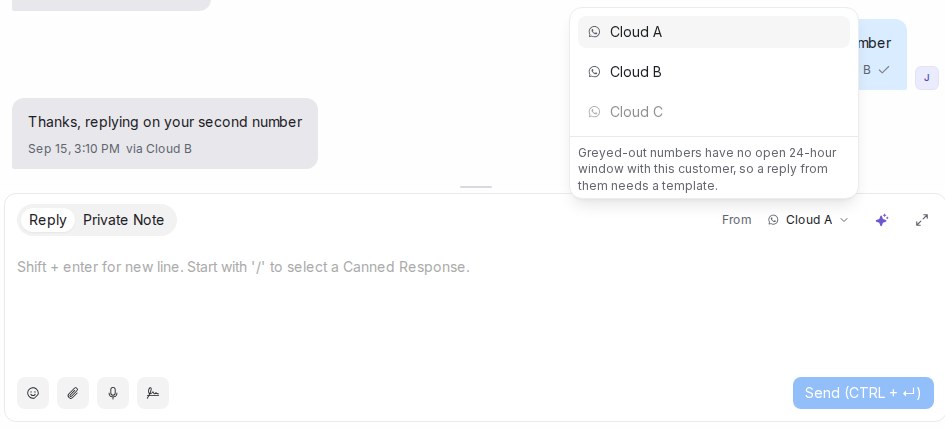
From only appears when you have more than one WhatsApp number to choose from.
Numbers shown greyed out cannot be used right now: a WhatsApp API number can only send a normal reply while the customer has messaged that number in the last 24 hours. The note under the list says so. Numbers connected as Normal WhatsApp have no such limit.
What the customer sees
Your reply arrives from the number you picked. On the customer’s phone it appears as a chat with that number, so they see it as a message from your second line rather than a continuation of the first.
What your team sees
Every message that went out from, or came in on, another number carries a via tag with that number’s name, so anyone reading the conversation knows which line spoke.
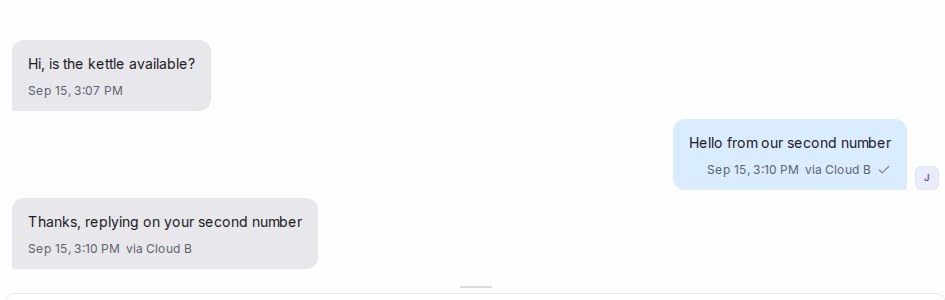
When the customer answers that number, their message lands in the same conversation, also tagged — no second conversation opens. Assignment, labels, reports and access stay with the conversation’s original inbox.
Good to know
- Private Note never uses the picker; notes stay internal.
- Only numbers you are a member of are offered. Administrators see every WhatsApp number of the account.
- Your pick stays for as long as you are in the conversation. When you come back to it later, From is on the conversation’s own number again.