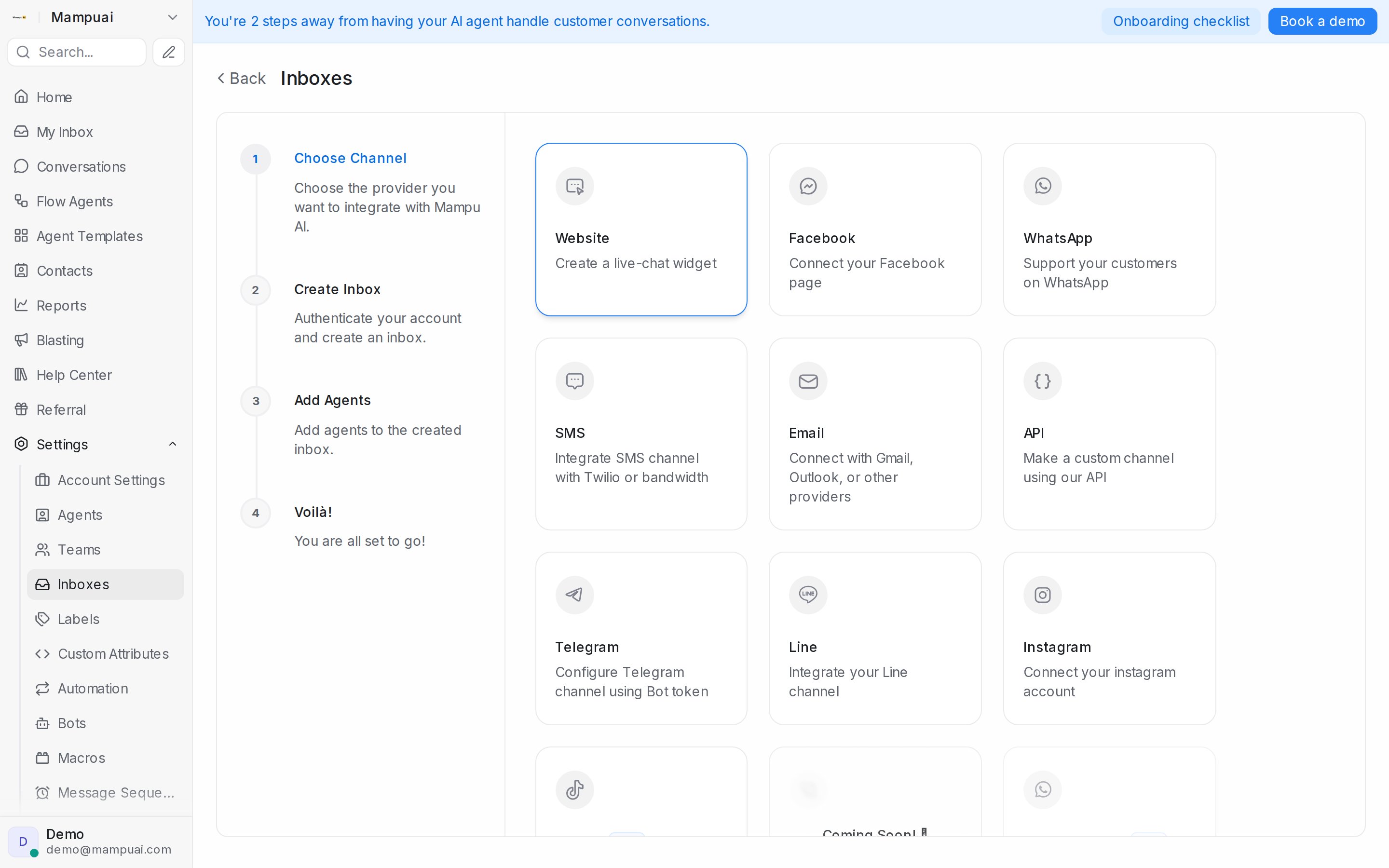
An inbox connects a communication channel to your account. Go to Settings → Inboxes and click Add Inbox, then pick a channel:
- Website — a live-chat widget for your site (guide).
- WhatsApp — via Official WhatsApp API or Normal WhatsApp Web Link (QR scan) (guide).
- Facebook and Instagram — connect your page and account (Facebook, Instagram).
- Telegram, Line, TikTok — bring your messaging apps into the same inbox (Telegram, LINE, TikTok).
- SMS — through Twilio or Bandwidth (guide).
- Email — connect any mailbox with Other Providers: forward incoming mail to the address generated for the inbox, and add your IMAP and SMTP credentials in the inbox settings for full two-way email (guide).
- API — a custom channel driven by your own systems (guide).
Watch the walkthrough
Settings → Inboxes lists every inbox with a search box. Each row has a settings icon that opens the inbox’s own page, with tabs for Settings, Collaborators, Business Hours, CSAT and the channel’s extras, and administrators also get Delete. See Inbox settings, tab by tab for every switch on those tabs.
For an inbox you only send from, such as a Blasting number, see Send-only inboxes.