
Seeing a customer’s history across channels
The same person often reaches you on more than one channel or number: a question on Facebook one day, a follow-up on WhatsApp the next. You don’t have to jump between their conversations to keep up. The conversation you have open shows their messages from their other conversations as well, in the order they were sent, and your flow agent can use what the customer already told you there.
What you see in a conversation
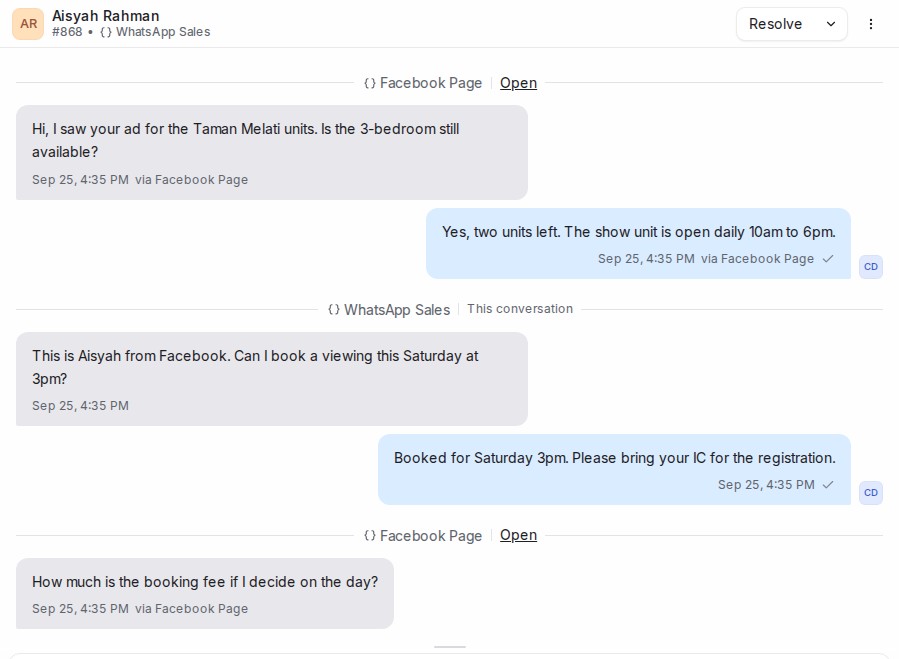
- Messages from the customer’s other conversations appear between dividers. Each divider names the inbox those messages came through and has an Open link to that conversation. The parts that belong to the conversation you have open are marked This conversation.
- Everything is shown in time order across all of the conversations, so a Facebook message sent at 9:02 sits above a WhatsApp message sent at 9:05.
- Scroll up to load older messages. They keep arriving from every conversation, oldest last.
- Messages from another conversation are there to read. To reply in that conversation, use Open on its divider. The reply box always sends to the conversation you have open.
- You see only the conversations in inboxes you belong to. Administrators see them all.
The Previous Conversations list in the contact panel on the right still gives you the same conversations as a list.
What your flow agent does with it
Your flow agent knows the customer is returning and can see the details they gave in earlier conversations, on any channel. On a question step with Confirm a value the customer gave before turned on, it shows that earlier answer for the customer to confirm or correct instead of asking from scratch. When it hands the conversation to your team, its note also lists the other channels the customer has used, for example Also on: WhatsApp ×2, Facebook ×1.
Keep an inbox’s history to itself
Sometimes two of your numbers belong to different projects or brands, and a customer who talks to both should not see one project’s questions mixed into the other. You can keep an inbox apart from the rest.
- Open Settings → Inboxes and choose the inbox.
- On the Settings tab, scroll down to Share history across inboxes and turn it off.
- Click Update.

With the switch off, the inbox is kept apart in both directions:
- Its conversations show only their own messages, and its messages stay out of the customer’s conversations in your other inboxes.
- The flow agent in that inbox doesn’t reuse answers the customer gave in other inboxes, and answers collected there don’t carry over anywhere else.
- The handoff note’s Also on line leaves that inbox out.
The switch is on for every inbox unless you turn it off.
Keep one conversation’s history to itself
You can do the same for a single conversation, whatever its inbox shares.
- Open the conversation.
- Open the ⋮ menu at the top right, next to Resolve, and choose Keep history separate.
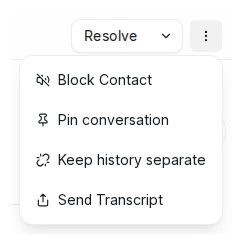
The conversation now shows only its own messages, stays out of the customer’s other conversations, and its answers are no longer reused by the flow agent. Your teammates see the change straight away, even if they already have one of the customer’s conversations open.
To undo it, open the same menu and choose Share history again.
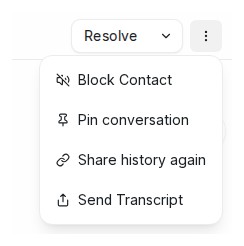
Any agent who can open the conversation can switch it either way. In an inbox whose own Share history across inboxes switch is off, the option isn’t offered, because that inbox already keeps everything to itself.
When the same person shows up as two contacts
History is shown per contact. A Facebook profile and a WhatsApp number are two separate contacts until you merge them, so their conversations don’t appear together before that. Open the contact, go to the Merge tab, pick the other contact, and confirm. From then on, both sets of conversations belong to one contact and show together.