
When someone comments on one of your TikTok videos, the comment arrives in your TikTok inbox as a conversation — and you can reply to it, by hand or automatically, without leaving Mampu AI. Replies are posted on TikTok publicly, nested under the original comment.
Watch the walkthrough
Before you start
- Your TikTok account must be a Business Account. You can switch in the TikTok app under Settings → Account → Switch to Business Account — it’s free.
- Connect the account in Settings → Inboxes → Add Inbox → TikTok and approve all the requested permissions — see Connecting a TikTok inbox. If you connected TikTok before comment support was available, disconnect and connect the inbox once more to grant the extra permissions.
How comments appear
Each commenter gets their own conversation in the TikTok inbox, collecting their comments across your videos. Reply in the conversation and your message is posted on TikTok under their latest comment. Comment conversations have no reply deadline — direct messages, by contrast, close 48 hours after the customer’s last message.
Automatic replies
Go to Settings → Inboxes → your TikTok inbox → Comment Replies and add a rule:
- Trigger keywords — the rule fires when a comment contains any of these words. Use
*to match every comment. - Video keywords (optional) — limit the rule to videos whose caption contains these words, for example only your promo videos.
- Public comment reply — the reply text. Personalize it with
{{first name}},{{last name}}or{{full name}}. - Like the comment — give matching comments a like from your account.
Rules are checked top to bottom and the first match wins — drag the cards to reorder them.
A few tips:
- Keep replies short and friendly, and vary the wording between rules — identical replies posted many times can be shown less prominently by TikTok.
- Comment replies are always public. To continue in private, invite the commenter to send you a DM — their message lands in the same TikTok inbox.
Answer from FAQs with AI
Turn on Answer from FAQs with AI on a rule and AI writes the public reply from your approved FAQs. A comment like “size 42 is UK what?” gets the answer from your size chart FAQ.
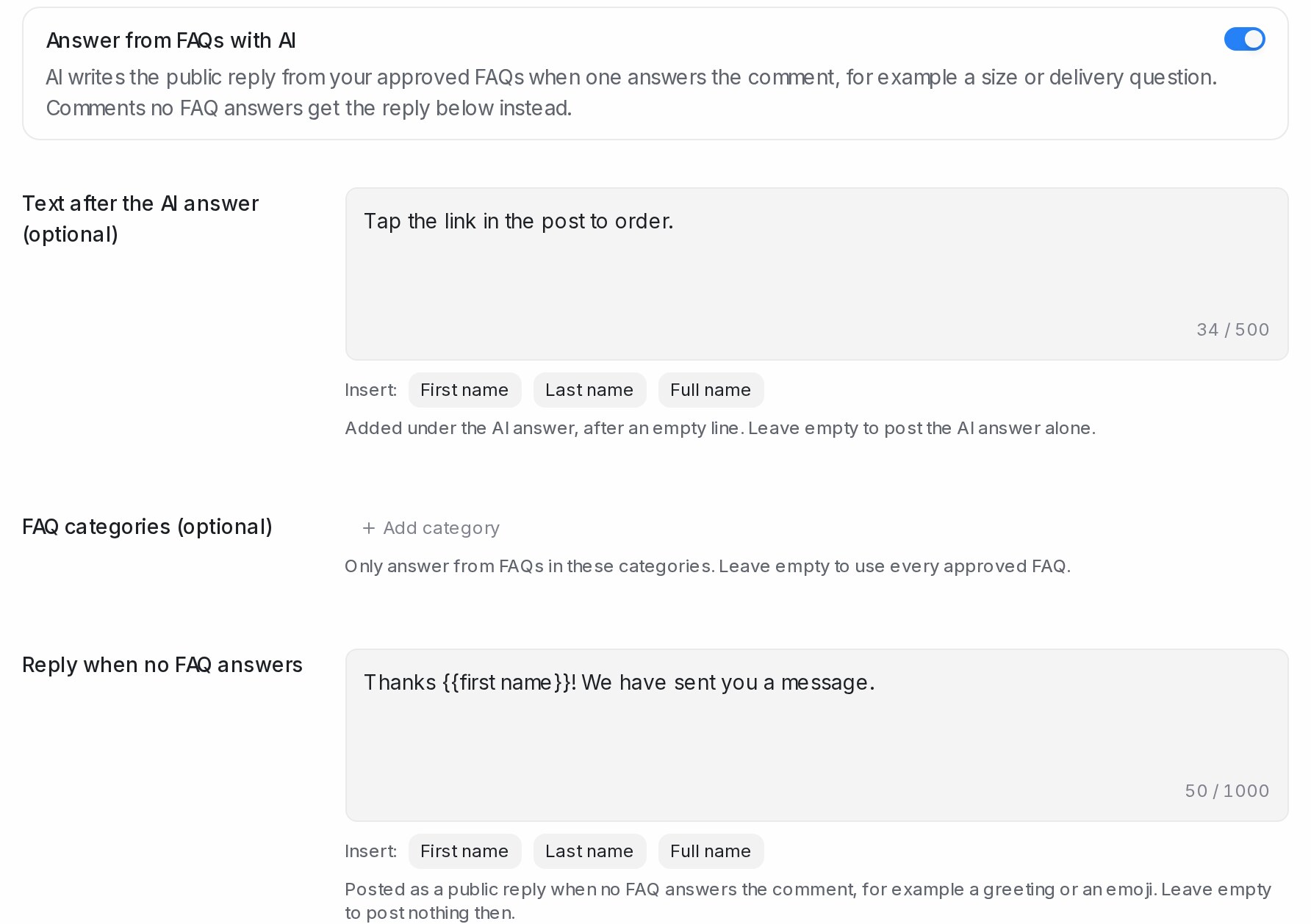
- Open the rule and turn on Answer from FAQs with AI.
- Optionally fill Text after the AI answer. It is added under the answer after an empty line, for example “Tap the link in the video to order.”
- Optionally pick FAQ categories, so the rule answers only from FAQs in those categories.
- Fill Reply when no FAQ answers. It is posted for greetings, emojis and questions your FAQs don’t cover. Leave it empty to post nothing then.
- Click Save.
The reply is short, in the commenter’s language, and answers from one FAQ. An FAQ you limited to certain customers is used only for a commenter who matches it. The rule uses your own AI key, or the Flow Agent’s AI credit when the inbox has a published Flow Agent.