
When your number is connected with the Normal WhatsApp Web Link option by scanning a QR code, the WhatsApp groups your number is in come into Mampu AI as conversations, next to your one-to-one chats. This page explains how they look and how they behave. It applies only to QR-connected numbers, not to Official WhatsApp API. To connect a number this way, see Connecting a WhatsApp inbox.
How group messages appear
Each group is one conversation. Because many people write in the same chat, every message from a group member starts with a sender line naming their number and WhatsApp name, for example:
+60 12 345 6789 - Name:
Telling a group chat apart in the list
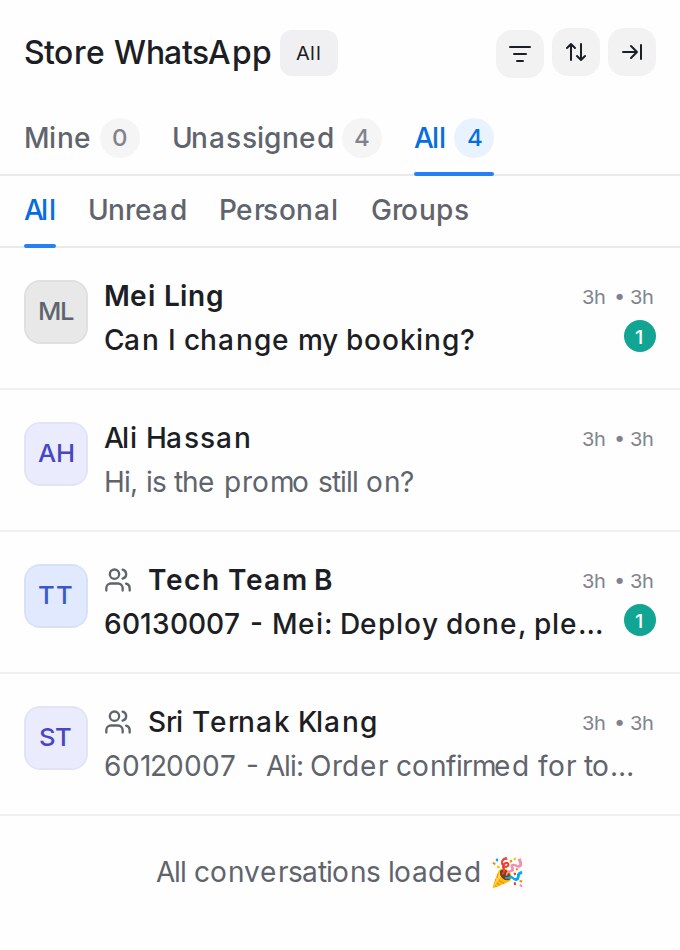
In the conversation list, every group chat carries a small people icon before its name, in every view. Hover over the icon to see WhatsApp group. One-to-one chats have no icon.
Showing only personal chats or only group chats
- In the sidebar under Channels, open the WhatsApp inbox connected by QR code.
- Under Mine, Unassigned and All, the row reads All, Unread, Personal and Groups. Pick Personal to keep one-to-one chats, or Groups to keep group chats.
- Pick All to see everything again.
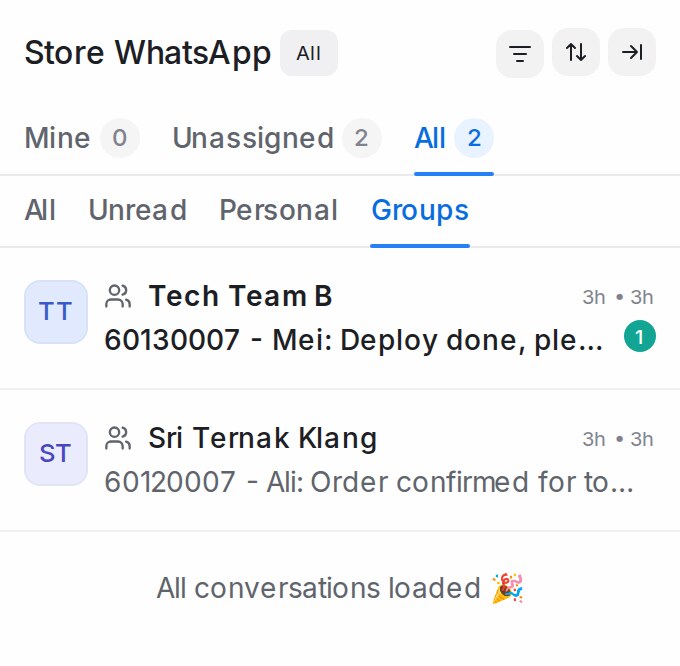
- The Mine, Unassigned and All counts follow your pick, and the status chip still applies.
- Your pick is remembered the next time you open a QR-connected inbox.
- Unread is on the same row, so picking it shows unread chats of both kinds.
- Personal and Groups appear only while a QR-connected inbox is open. The full Conversations list shows All, Unread, Unattended and Mentions, and other inboxes show All and Unread.
Reactions
When someone in a group reacts to a message with an emoji, the reaction appears in the conversation with the same sender line, so you can see who reacted.
A reaction is marked as a reaction, not a new message:
- Your Flow Agent doesn’t treat a reaction as a new customer message.
- To stop reactions from starting a reply countdown, open Settings → Reply SLA, edit the SLA and turn on Ignore emoji reactions. See Reply SLA.
When your number leaves a group
When your number leaves a group, or is removed from it, the group’s conversation is resolved automatically and this note appears in it:
This WhatsApp number is no longer a member of the group, so the conversation was resolved
Resolving the conversation stops its Reply SLA countdown, so no alert is raised for a group you can no longer reply to.
Other members joining or leaving the group changes nothing — the conversation stays as it is.