
Reach customers on WhatsApp with two options under Blasting:
- WhatsApp Business App — for the standard WhatsApp Business setup. Write a free-form message, attach media if you like, and messages go out gradually (drip sending) to keep your number healthy.
- WhatsApp API (WABA) — for the official WhatsApp Business Platform. Select an approved WhatsApp Template and its language. A template with an image, video or document at the top comes with that file already attached, with a preview of what goes out; remove it to send a different file with this blast only. If that file is over WhatsApp’s size limit, it shows in red and Create stays off until you replace it. See The WhatsApp Templates library and Picture and file size limits.
Watch the walkthrough
For both, pick the audience — filter your contacts (for example by label) or upload a list of people — and set the scheduled time for the send. You can also skip anyone who already received an earlier blasting or, on WhatsApp API (WABA), the template you are sending. See Creating and scheduling a blasting.
WhatsApp requires pre-approved templates for proactive (outbound) messages on the official API, so prepare your templates first.
Tip: your AI agent can prepare a WhatsApp blasting draft for you to review and send — see Prepare a WhatsApp blasting with AI.
How your WhatsApp API blasts delivered

The Overview at the top of the Blasting page sums up the period you pick — Last 7 days, Last 30 days, Last 90 days, This month or Last month — and compares it with the equal period before it. The green or red figure beside a percentage is that change, in points.
| Tile | What it counts |
|---|---|
| Blasts | Blasts that ran in the period. |
| Sent | Messages WhatsApp accepted. Messages stopped by a payment, media or template problem are left out. |
| Delivered | Messages that reached the customer’s phone, opened or not, as a share of sent. |
| Read | Messages the customer opened, as a share of sent. Customers can switch read receipts off, so this is a lower bound. |
| Replies | Replies received, as a share of sent. |
The Overview counts blasts from WhatsApp API (WABA) numbers only, so its Blasts figure can be lower than the All chip on the list below it.
What each blast’s figures mean

Each blast sent from a WhatsApp API (WABA) number shows these figures in its row of the Blasting list once WhatsApp has accepted its messages, each as a share of Sent. Hover a column name to see what it counts. Problems show under the blast’s name, such as 1 failed or 2 not sent: click one to see the reasons in plain words. Pending messages show under the status.
| Figure | What it means | Charged by Meta? |
|---|---|---|
| Delivered | Reached the customer’s phone, opened or not. | Yes |
| Read | Opened by the customer, as a share of sent. With read receipts off, the message counts as Delivered only. | Yes |
| Failed | WhatsApp tried and could not deliver: the message was held by Meta’s marketing limit, the customer opted out of marketing, or the number is not on WhatsApp. | No |
| Pending | Accepted, but no receipt yet — the phone was off or WhatsApp not opened. WhatsApp keeps trying for 30 days. | Only once it delivers |
| Expired | Pending for more than 30 days; WhatsApp stopped trying. | No |
| Not sent | Stopped before WhatsApp tried: a payment, media or template problem. Left out of the shares. | No |
A message delivered inside a customer’s free ad window is not charged — see The free ad window. Blasts from a WhatsApp Business App number or a Facebook Page show Sent and Replies only; their row reads Not reported by this channel in place of the rest.
Optimised delivery for marketing templates
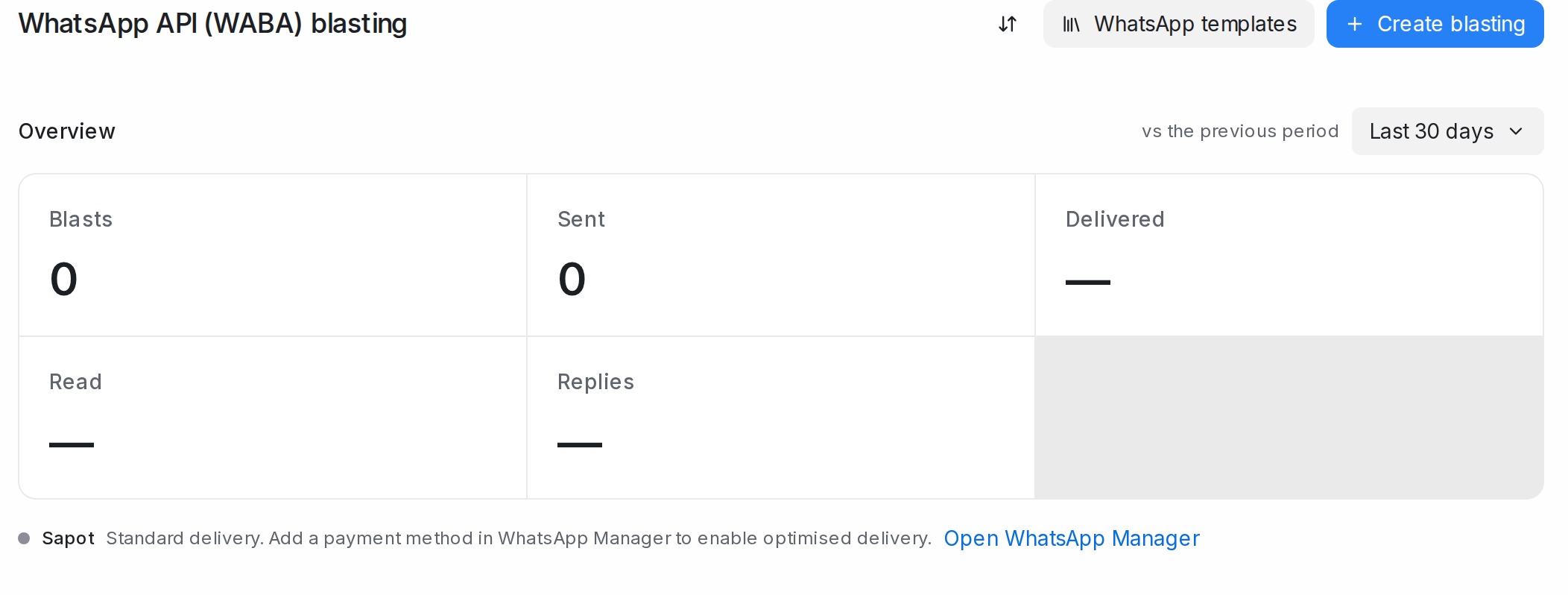
Meta offers a second way to send marketing templates, the Marketing Messages API: Meta times each message for the customer most likely to engage and paces the send to keep your number healthy. Mampu AI uses it for every marketing template a WhatsApp API (WABA) number sends — blasts, template messages from the inbox, sequences and automations — as soon as Meta has switched it on for that number. Utility and authentication templates are not affected, and you create a blast exactly as before.

On the Blasting page, a workspace with one WhatsApp API number sees one line for that number. With several numbers, one line counts how many are on, the numbers that need a payment method or are waiting on Meta are listed under it, and Show all numbers lists every number. The same line shows under the number picker in the Create blasting dialog and in the number’s Configuration tab (Settings → Inboxes). Each number’s line tells you where it stands:
| Line | What it means | What to do |
|---|---|---|
| Optimised delivery: on | Marketing templates from this number already take the optimised route. | Nothing. |
| Standard delivery. Add a payment method in WhatsApp Manager to enable optimised delivery. | Meta needs a card on your messaging account before it switches the route on. | Click Open WhatsApp Manager beside the line, add a card to your messaging account (see Adding a payment card for the Official WhatsApp API); if WhatsApp Manager asks you to accept Meta’s marketing messages terms, accept them. Mampu AI re-checks every night, and the line reads on within a day. |
| Standard delivery. Meta is still setting up optimised delivery for this number. | Your part is done; Meta is finishing the setup. | Wait a day or two. |
| Standard delivery. Optimised delivery is not available for this number. | Meta does not offer the route for this number, for example one that also runs the WhatsApp Business app. | Nothing; marketing templates keep going out the standard way. |
Until Meta switches a number on, its marketing templates go out the standard way, with the same delivery figures. Billing does not change: Meta charges a marketing template per delivered message as before; on a message delivered through the optimised route, the pricing chip on the bubble reads Marketing lite.